
Manager portal
Redesign of the manager experience in Heroma, focused on
simplifying daily workflows and reducing cognitive load
for one of the system’s most complex user groups.
UX Redesign
WCAG
UI design
Prototyping
Context
The initial concept focused on presenting a wide range of features, KPIs, and quick links based on system functionality.
However, early validation showed that this approach did not align with how managers actually work.
• The solution was too complex and feature-heavy
• It did not reflect real daily workflows
• It required users to adapt to the system
Rather than simplifying the experience, it risked increasing cognitive load.
The problem
The current experience introduced friction in what should be a simple
and repetitive workflow.
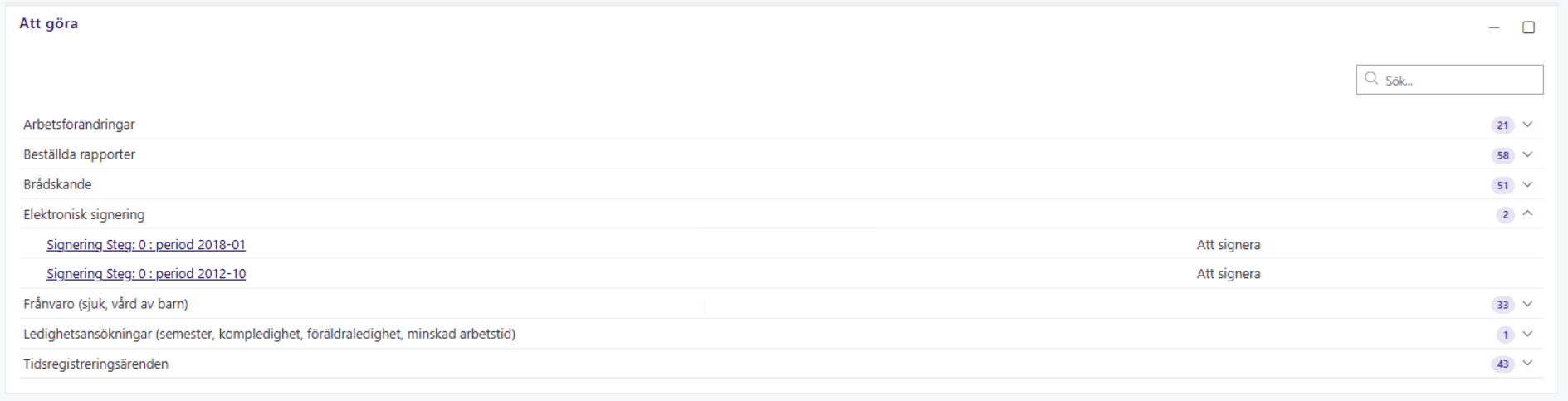
• Users were redirected to a new page for each case
• Important actions were not clearly structured
• The layout contained unused space and lacked focus
This made the process slower and less intuitive, especially for
frequent users.
My role
UX designer & Project lead
Led the design process from initial concept to validated solution,
including research, stakeholder alignment, and user testing.
Process
Initial concept
I started by identifying and mapping all potential manager-facing functionalities within Heroma, resulting in a broad feature set.
This was validated internally with Product Owners to understand which features were actively used and considered important.
User research
To validate the concept, I conducted focus group sessions with manager-heavy customers.
Instead of presenting solutions directly, I asked participants to walk through a typical workday to understand real behavior and priorities.
Reframing the problem
The insights revealed a clear misalignment between the initial concept and actual user needs.
This led to a complete redesign of the solution, shifting focus from feature exposure to task prioritization.
Key insights
• Usage was inconsistent across users
• Users created their own workflows
• Existing features were hidden
• Lack of onboarding increased complexity
Problem framing
• Usage was inconsistent across users
• Users created their own workflows
• Existing features were hidden
• Lack of onboarding increased complexity
Solution
Before
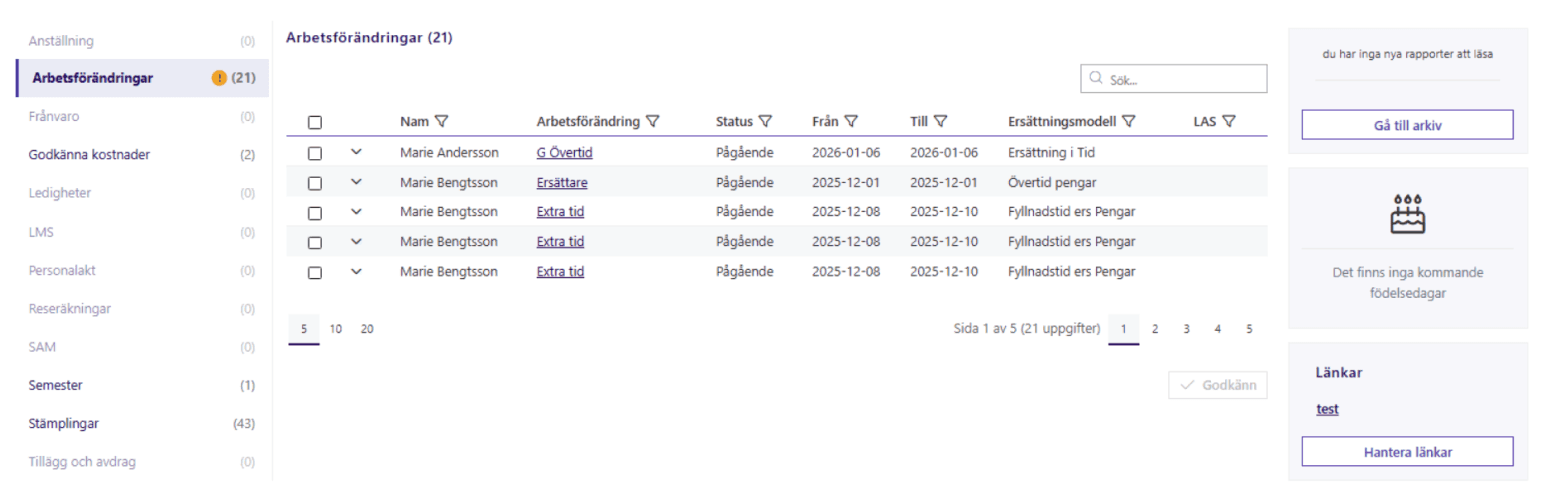
After
Key improvements
Clear navigation
Redesigned the category menu to improve scannability and reduce cognitive load.
Task prioritization
Introduced visual prioritization to help users focus on high-impact tasks first.
Improved search and filtering
Enhanced the search functionality with filtering options to help users quickly find relevant item
Decision-supporting overview
Added a high-level summary of tasks to provide immediate insight into workload and priorities.
Impact
Faster decision-making
Users can identify priority tasks in seconds.
Improved efficiency
Enabled bulk actions to support power users and reduce repetetive actions.
Design thinking
The design focused on prioritization and supporting managers’ real workflows.
By shifting from feature-heavy dashboards to a task-focused overview, the solution helps users quickly understand what requires attention and act efficiently.
Outcome
• Strong positive feedback from users
• Improved clarity and focus in daily workflows
• Reduced time spent navigating the system
• Increased confidence in task prioritization
User feedback confirmed that the solution aligned closely
with real-world usage and expectations.
Reflection
A key takeaway from this project was the importance of early user validation.
The initial concept, although well-structured from a system perspective, did not reflect how managers actually work.
By shifting focus from features to real user behavior, the solution became significantly more effective.
This reinforced the importance of understanding not just what users can do in a system, but what they actually need to do
in their daily work.