
Redesign of the case management component in Heroma to
improve efficiency, reduce unnecessary navigation, and create
a more consistent and scalable experience.
UX Redesign
WCAG
Context
The case component in Heroma is used by managers and administrators to handle employee requests such as vacation, sick leave, and job changes.
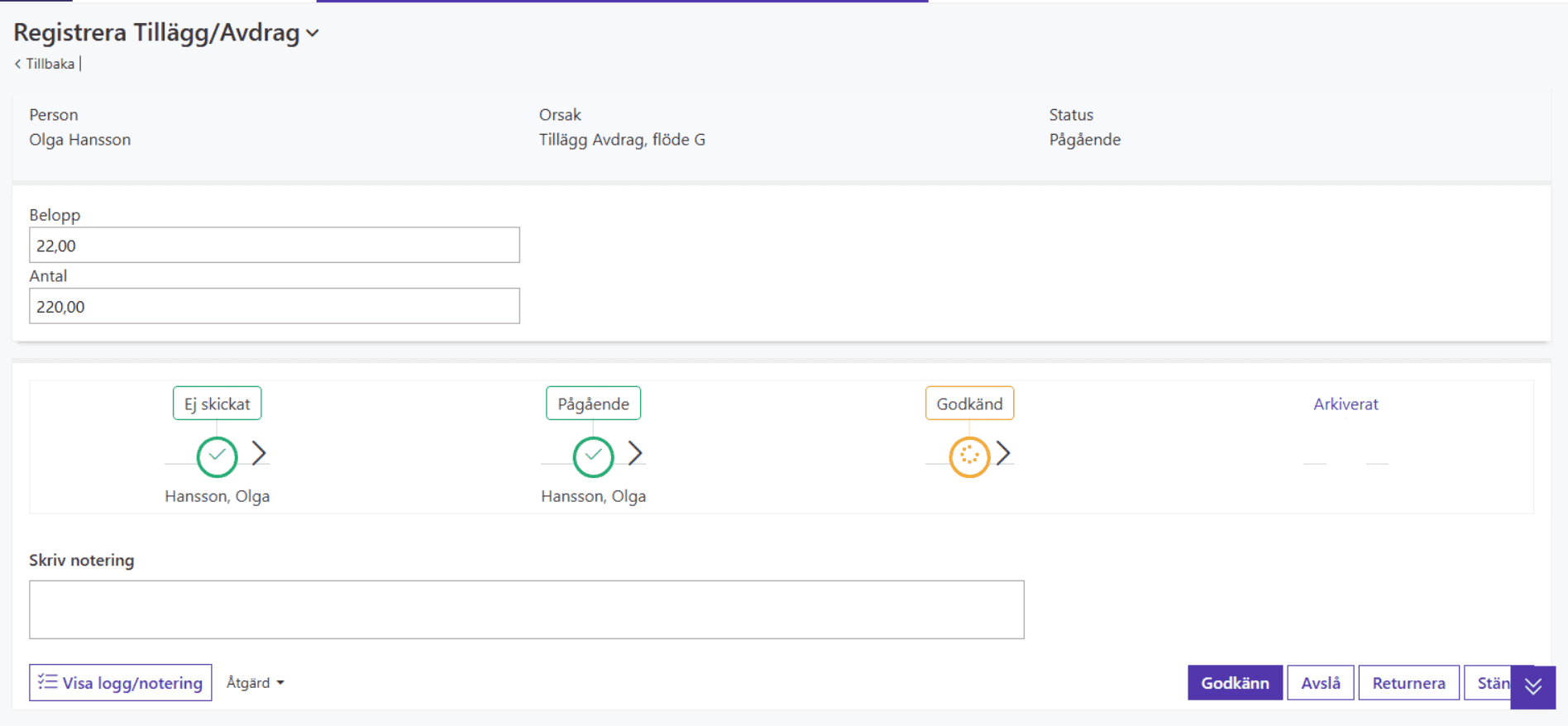
In the existing solution, each case was handled on a separate page with a significant amount of unused space. This resulted in unnecessary context switching and inefficient workflows.
In addition, each case type lacked a consistent structure, making the
experience fragmented and harder to navigate.
The problem
The current experience introduced friction in what should be a simple
and repetitive workflow.
• Users were redirected to a new page for each case
• Important actions were not clearly structured
• The layout contained unused space and lacked focus
This made the process slower and less intuitive, especially for
frequent users.
My role
UX designer
Worked closely with Product Owner and Business Analyst to map
functionality, validate assumptions, and define the overall interaction model.
Discovery
I worked closely with the Product Owner and Business Analyst to map the
current functionality and understand actual usage.
This included identifying essential features, underutilized functionality,
and redundant elements.
Validation
To validate assumptions, I analyzed system usage data.
A key finding was that features perceived as critical, such as comments,
were rarely used in practice. This allowed me to challenge existing
assumptions and focus the design on what users actually rely on.
Key insights
• Core actions needed to be faster and more accessible
• Many features added complexity without real value
• Users benefited from clearer structure and guidance
• Small usability issues created unnecessary friction
Problem framing
The main challenge was not missing functionality, but lack of structure and focus.
The experience needed to shift from page-based navigation to a more streamlined, in-context interaction model.
Solution
Before
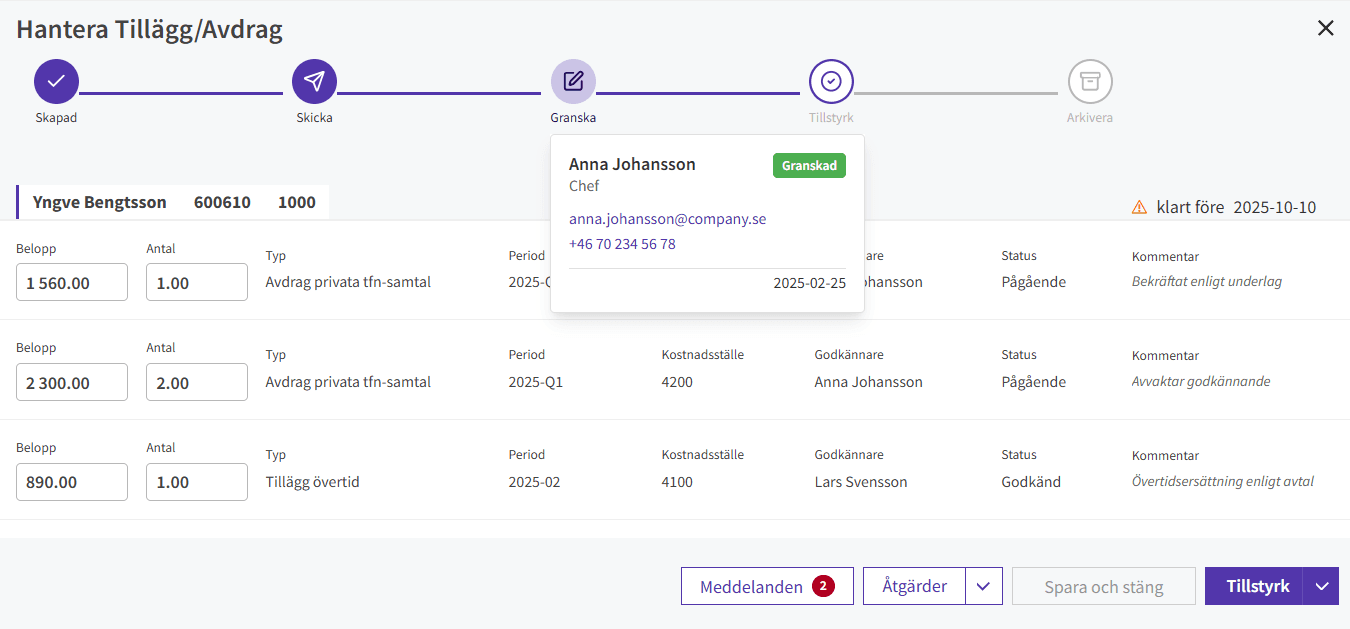
After
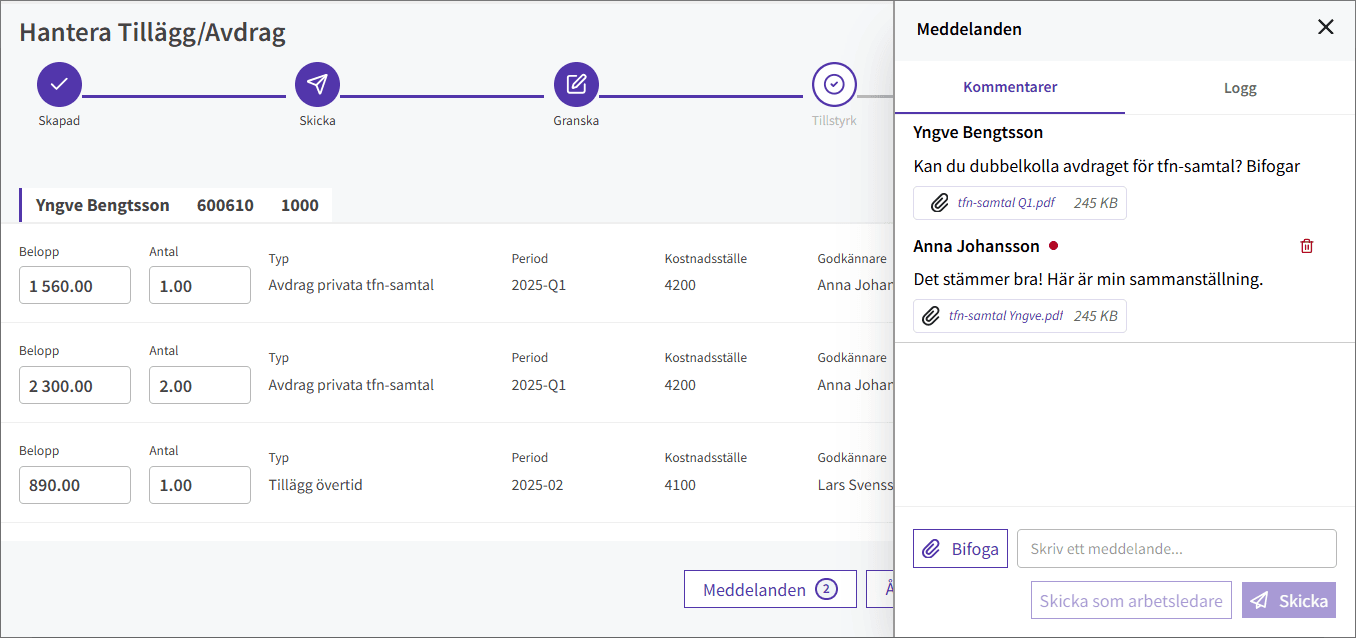
Key improvements
Process visualization
Redesigned stepper to clearly show workflow stages and status.
Integrated comunication
Added in-workflow messaging panel to centralize discussions and files.
Reduced context switching
Unified panels for reviewing, messaging and taking action.
Improved readability
Organized data for better structure and easier comparison.
Status visibility
Enhanced indicators to clearly show current status and approver.
Action-focused layout
Primary actions (approve, reject, return) consistently placed and accessible.
Impact
Faster decisions
Users act without leaving the page.
Less context switching
All actions in one view.
Better clarity
Status and responsibility are instantly visible.
Design thinking
The redesign focused on simplifying decision-making and improving consistency across case handling.
By consolidating functionality into a structured and reusable component, the solution reduces friction and supports a more intuitive approval process.
Reflection
A key takeaway from this project was the importance of validating
assumptions early.
While certain features were considered critical by stakeholders,
data and testing revealed that they were rarely used in practice.
This reinforced the importance of grounding design decisions in
actual user behavior rather than perceived needs.
It also highlighted the value of simplifying workflows, not by removing
functionality, but by structuring it more effectively.