
Design of a custom accessibility solution for Heroma,
aimed at ensuring WCAG compliance while improving usability
for a broader range of users, including those with cognitive needs.
UX Redesign
WCAG
Context
In preparation for new WCAG requirements, Heroma invested
in improving accessibility across the platform.
While many accessibility efforts focus on technical compliance,
there was an opportunity to go further — creating a solution that
not only meets standards, but actively improves usability for
different types of users.
This led to the idea of developing a custom accessibility tool
integrated into the product.
The problem
Existing accessibility solutions often focus on physical
impairments, such as vision or motor limitations.
However, support for cognitive accessibility was limited.
• Accessibility features were fragmented
• Solutions often relied on overlays
• Cognitive needs were largely overlooked
This created a gap between compliance and real usability.
My role
UX designer
Responsible for research, concept development,
and defining both functionality and interaction design.
Process
Application review
I evaluated Heroma using tools such as Axe DevTools
and Lighthouse, combined with manual testing using
keyboard navigation and screen readers.
Benchmarking
I analyzed existing accessibility tools to understand
common patterns and user expectations.
This helped identify what users are already familiar with
and what works in practice.
User insights
To better understand cognitive accessibility,
I collaborated with an external organization conducting
evaluations with users with real cognitive disabilities.
This provided insights beyond typical internal perspectives.
Key insights
• Accessibility is often focused on physical needs
• Cognitive accessibility is underrepresented
• Overlays can interfere with existing assistive tools
• Users benefit from flexible, customizable solutions
Problem framing
The challenge was not only to meet accessibility standards,
but to create a solution that integrates seamlessly into the
existing product.
The tool needed to support different user needs without
disrupting existing workflows or assistive technologies.
Solution
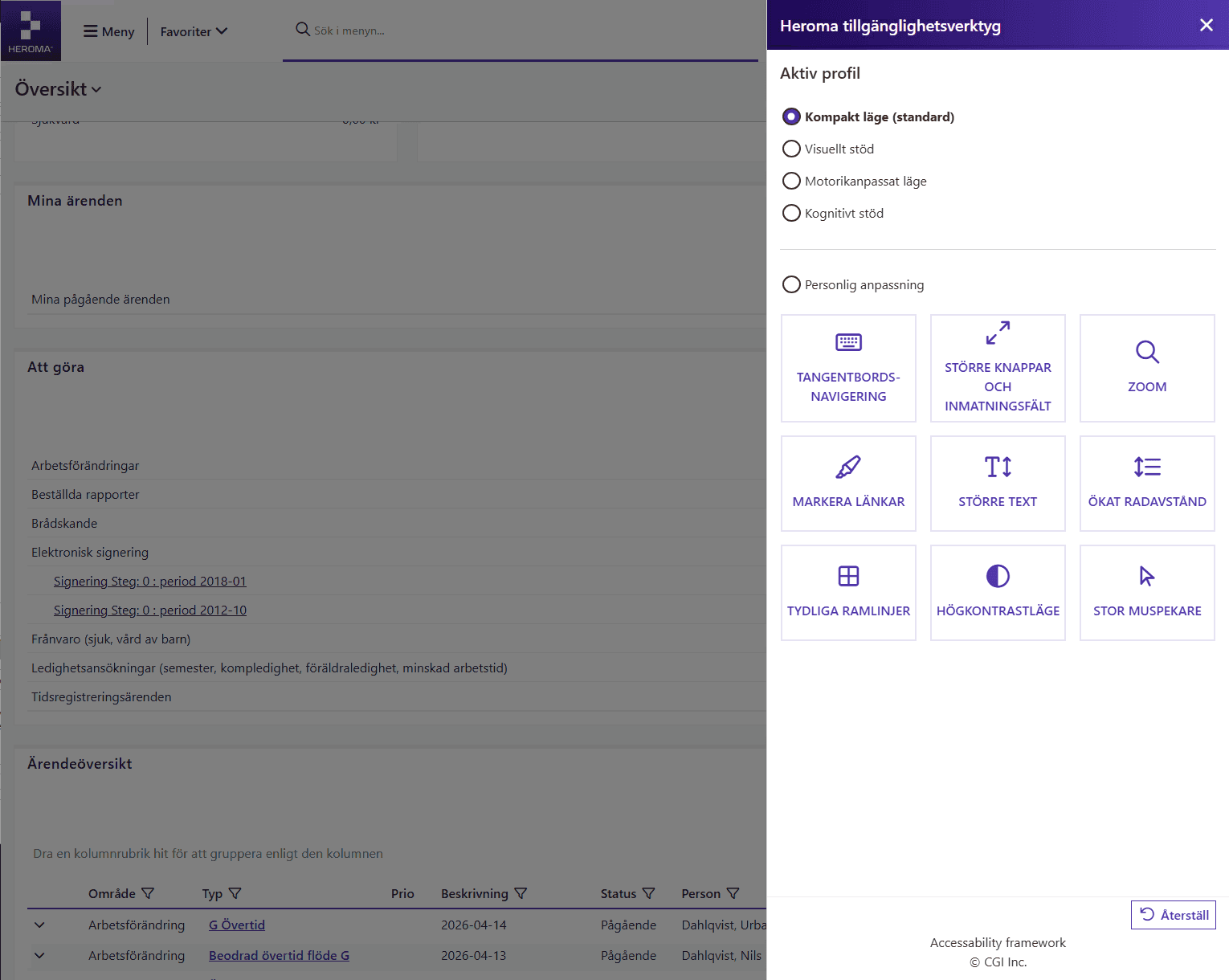
Key improvements
Accessablility as a layer
Designed an accessibility tool that allows users to tailor the interface to their individual needs.
Cognitive & physical support
Introduced predefined profiles (e.g. visual, motor, cognitive support) to simplify setup and reduce decision fatigue.
Modular customization
Enabled individual accessibility features (e.g. larger text, increased spacing, high contrast) to be toggled independently.
Impact
More inclusive experience
Changes are applied instantly, allowing users to directly experience the impact of their adjustments.
Reduced cognitive load
The solution is designed as a reusable framework that can be applied across the entire system.
Improved usability for all
Accessibility benefits for every user and their terms.
Design thinking
Accessibility was treated as a core design principle rather than an add-on.
By giving users control over how they interact with the interface, the solution supports both permanent and temporary needs, creating a more inclusive and adaptable experience.
Outcome
• Improved accessibility across the platform
• Better support for both physical and cognitive needs
• Increased flexibility for different user groups
• Strengthened compliance with WCAG standards
The solution positioned Heroma as a more inclusive
and accessible product.
Reflection
This project highlighted the importance of expanding
the definition of accessibility beyond compliance.
By including perspectives from users with cognitive
disabilities, we uncovered insights that would not have
emerged through standard evaluation methods.
It reinforced the importance of designing for a wider
range of user needs, and ensuring that accessibility
solutions integrate naturally into the product,
rather than being added as separate layers.